Folder Preview Pro 2.8.0 for MacOS Download

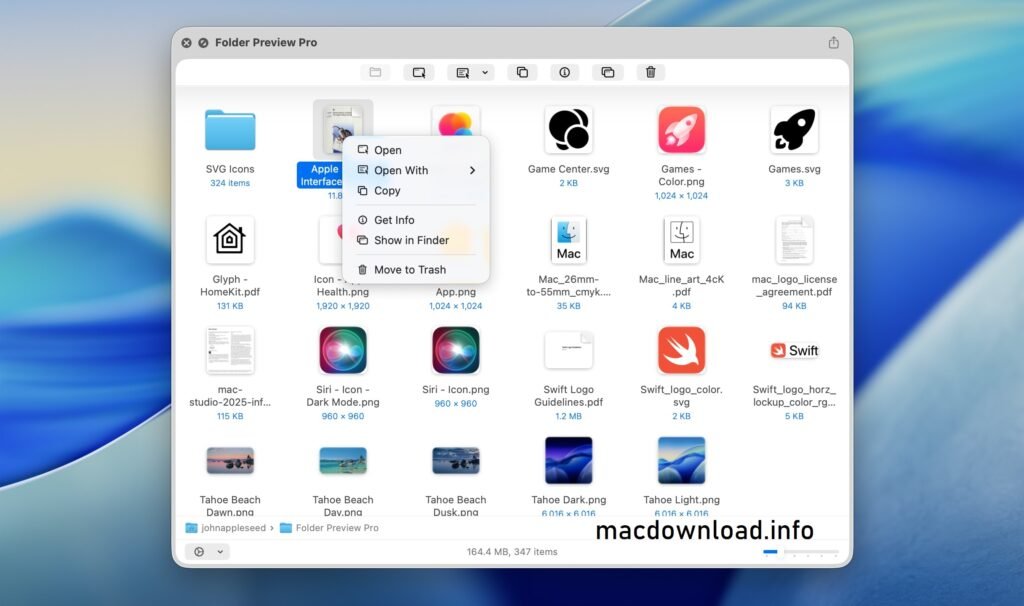
Folder Preview Pro for Mac 2.8.0 is designed to offer advanced folder customization and visual previews directly in Finder. Instead of opening multiple folders to check their contents, users can instantly preview files as thumbnails on the folder icon itself. As a result, navigation becomes faster, clearer, and more intuitive. This feature is especially useful for creatives who rely on visual cues to quickly locate projects.
Furthermore, Folder Preview Pro for Mac integrates seamlessly with macOS, ensuring native and stable customization. The latest version, 2.8.0, improves performance, optimizes compatibility with modern macOS versions, and introduces streamlined controls for even greater customization. So, whether you’re a casual Mac user or a professional content creator, this software offers a smarter way to manage your folders. It enhances the standard macOS folder view by enabling customizable previews, making it easier to identify content at a glance.
Key Features of Folder Preview Pro for Mac 2.8.0
1. Dynamic Folder Previews
One of the standout features of Folder Preview Pro for Mac is its dynamic folder previews. Instead of the generic blue folder icons, the software displays thumbnails of the files within the folder. This allows you to instantly recognize the folder’s contents without having to open it.
This feature supports multiple file types, including:
- Images (JPEG, PNG, HEIC)
- Videos
- PDFs
- Documents
- Design Files
As a result, users who work with multimedia content greatly benefit from this visual representation.
2. Customizable Preview Design and Style
Customization is another strength of Folder Preview Pro for Mac. Users can:
- Adjust the number of previewed items
- Change grid styles
- Modify spacing and alignment
- Choose the background appearance
Thanks to this flexibility, users can adapt folder previews to their workflow and aesthetic preferences.
3. Real-Time Updates
- Whenever new files are added to or removed from a folder, the preview is automatically updated. Therefore, there is no need to update manually. This real-time functionality ensures accuracy and consistency across the entire file system.
4. Drag-and-Drop Simplicity
- The application offers an intuitive drag-and-drop interface. Simply select a folder and apply the preview settings instantly. Even beginners can navigate the software without any technical knowledge.
5. Seamless Finder Integration
- Unlike third-party tools that disrupt system performance, Folder Preview Pro integrates seamlessly with Finder. It works with macOS without affecting system stability. As a result, users enjoy enhanced functionality without compromising performance.
6. High-Resolution Thumbnail Support
- For professionals working with high-resolution images or video files, the software maintains image clarity in previews. This is especially beneficial for photographers and graphic designers who need precise visual cues.
7. Batch Processing
- Users managing a large number of folders can apply preview settings in bulk. This saves time and ensures consistency across all directories.
What’s New in Version 2.8.0
Folder Preview Pro for Mac 2.8.0 introduces several improvements and adjustments to optimize performance and compatibility.
Improved macOS Compatibility
- The latest update ensures greater compatibility with the most recent versions of macOS. This results in fewer crashes, smoother operation, and optimized use of system resources.
Improved Preview Rendering Engine
- Version 2.8.0 improves the speed and clarity of thumbnail rendering. Previews now load faster, even in folders with high-resolution files. As a result, workflow efficiency is significantly increased.
Performance Optimization
- The developers have focused on reducing memory usage. As a result, the application runs more efficiently in the background without slowing down the Finder.
Stability Improvements
- Bug fixes and system improvements ensure a more reliable experience. Users will notice fewer crashes and more consistent preview updates.
Improved User Interface
- The user interface in version 2.8.0 is cleaner and more intuitive. Settings are better organized, allowing users to easily customize previews.
You Can Also Download: Whisper Transcription 13.13 for Mac
System Requirements
Before installing Folder Preview Pro for Mac 2.8.0, ensure your system meets the following requirements:
- macOS 10.13 High Sierra or later
- Intel or Apple Silicon processor
- 4 GB of RAM (8 GB recommended)
- 100 MB of free disk space
- Finder access permissions enabled
Advantages and Disadvantages
Advantages
- Enhances the Finder with real-time folder previews
- Intuitive interface
- Real-time updates
- Supports multiple file formats
- Batch customization options
- Lightweight and efficient
- Apple Silicon compatible
Disadvantages
- Limited functionality beyond folder previews
- Requires macOS compatibility
- Some advanced customization options may require configuration
Conclusion
Folder Preview Pro for Mac 2.8.0 is a practical and visually powerful enhancement for macOS users. By transforming standard folders into informative and content-rich previews, it simplifies navigation and boosts productivity. Whether you manage creative assets, business documents, or educational materials, this software offers a smarter way to stay organized.