FSNotes 7.1.0 for MacOS
FSNotes 7.1.0 for MacOS Download 2026
FSNotes 7.1.0 for Mac is a powerful, lightweight, and developer-friendly note-taking application designed to help users manage text-based information efficiently. Built with speed, simplicity, and flexibility in mind, FSNotes has become a popular choice among writers, developers, students, and professionals who prefer working with plain text and Markdown files.
Unlike traditional note-taking apps that rely on proprietary databases, FSNotes works directly with files stored on your Mac. This approach ensures transparency, portability, and long-term access to your notes. With version 7.1.0, FSNotes continues to refine its performance, stability, and usability, making it an even more reliable tool for daily productivity.
Key Features of FSNotes 7.1.0 for Mac
FSNotes is known for its clean interface and efficient workflow. Below are the most important features that define the FSNotes experience.
Fast and Lightweight Performance
- One of the main advantages of FSNotes is its speed. The application is optimized to handle thousands of notes without any noticeable lag. It uses native macOS technologies, ensuring smooth scrolling, instant search results, and fast file indexing.
Because FSNotes stores notes as plain text files, it consumes fewer system resources compared to heavier note-taking applications. This makes it compatible with both older and newer Mac devices.
Markdown Support
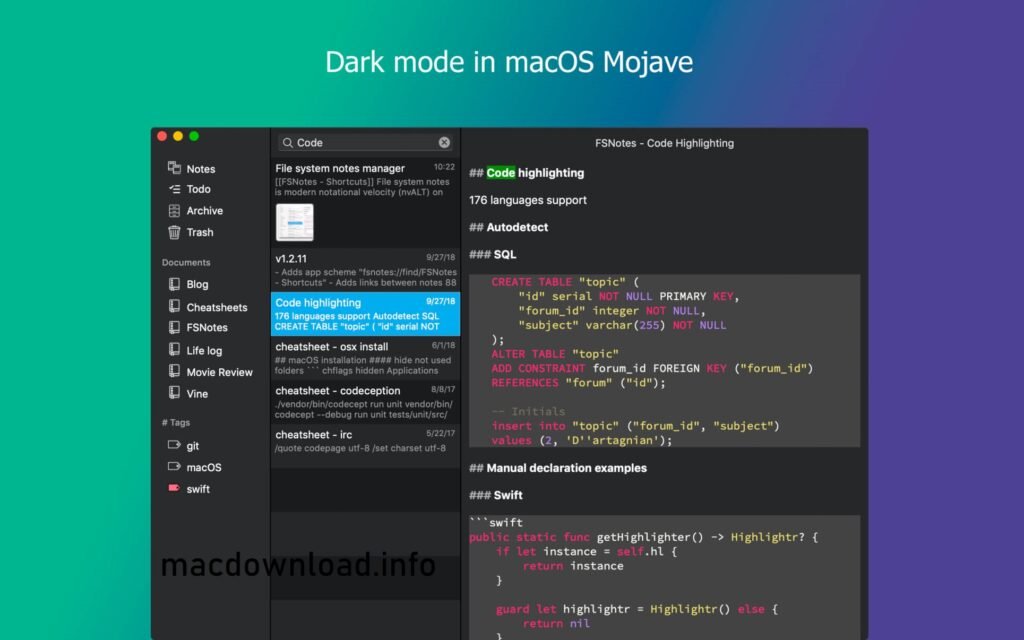
FSNotes offers full Markdown support, allowing users to format text with a simple syntax. This feature is especially useful for developers, technical writers, and bloggers who prefer to write in Markdown for clarity and consistency.
Key Markdown features include:
- Headings, lists, and tables
- Code blocks and inline code
- Links and images
- To-do lists and checkboxes
Markdown preview is available, making it easy to switch between writing and reading modes.
Local file storage and iCloud syncing
- FSNotes works directly with your Mac’s folders. You can choose any directory as a storage location for your notes, including local folders or iCloud Drive.
With iCloud syncing, your notes stay up-to-date across multiple Apple devices. This ensures seamless access, whether you’re working on a MacBook, iMac, or other compatible Apple hardware.
Advanced search and tagging
Searching your notes is fast and accurate in FSNotes. The app supports:
- Instant full-text search
- Tag-based filtering
- Markdown and filename searches
Tags can be added using hashtags within your notes, making organization intuitive and flexible. This system is ideal for users who manage large volumes of information.
Keyboard-Controlled Workflow
- FSNotes is designed for users who prefer keyboard shortcuts. Virtually all actions can be performed without using the mouse, significantly improving productivity.
Features such as quick note creation, agile navigation, and instant search make FSNotes the ideal choice for advanced users.
Code-Friendly Environment
- Developers often choose FSNotes for its support of code snippets and syntax highlighting. Notes containing programming code are displayed clearly, making it easy to store documentation, snippets, and ideas in one place.
Open File Format
- Because FSNotes uses plain text and Markdown files, your notes are not limited to a proprietary format. You can open, edit, or move them with any text editor at any time. This ensures long-term accessibility and data security.
What’s New in FSNotes 7.1.0
FSNotes 7.1.0 introduces a number of improvements focused on performance, stability, and the overall user experience. While this update doesn’t drastically change the core functionality, it refines existing features and addresses user feedback.
Performance Improvements
- Version 7.1.0 improves indexing speed and reduces memory usage, especially for users with large note libraries. Searching for and opening files feels more responsive, even when managing thousands of notes.
Improved macOS Compatibility
- FSNotes 7.1.0 is optimized for the latest versions of macOS. This ensures better system integration, smoother animations, and fewer compatibility issues when running on modern Mac hardware.
Bug Fixes and Stability Improvements
- This version fixes several minor bugs reported in previous versions. These fixes contribute to a more stable experience, reducing unexpected crashes and sync inconsistencies.
User Interface and Usability Improvements
- Minor adjustments have been made to the interface to improve readability and navigation. These changes help maintain FSNotes’ clean and minimalist design while enhancing ease of use.
Improved File Management
- File monitoring and synchronization have been refined to ensure that changes made outside the application are detected more reliably. This is especially helpful for users who edit notes with multiple tools.
You Can Also Download: PDF Expert 2.2.20 for Mac
System Requirements
- Operating System: Latest version of macOS
- Processor: Apple Silicon or modern Intel processor
- RAM: 8 GB or more
- Storage: SSD with sufficient free space
- Internet Connection: Stable connection for cloud syncing
Advantages and Disadvantages of FSNotes 7.1.0
Like any application, FSNotes has advantages and disadvantages. Understanding both helps you determine if it fits your workflow.
Advantages
- Fast and lightweight performance
- Full Markdown support
- Plain text and open file format
- Excellent search and tagging system
- Keyboard-centric productivity
- iCloud and local folder support
- Ideal for developers and writers
Disadvantages
- Limited rich text formatting
- Not suitable for notes with a lot of multimedia
- Learning curve for users unfamiliar with Markdown
- Fewer visual customization options compared to mainstream applications
Conclusion
FSNotes 7.1.0 for Mac is a refined and reliable note-taking solution that prioritizes speed, simplicity, and transparency. By working directly with plain text and Markdown files, it offers unparalleled flexibility and long-term data security. This version improves performance, macOS compatibility, and addresses stability issues, making it a solid upgrade for current users.
Homepage:https://macdownload.info/