GraphicConverter 12.5.1 for MacOS
GraphicConverter 12.5.1 for MacOS Download

GraphicConverter for Mac has long been recognized as one of the most versatile and reliable image editing and file conversion tools available for macOS users. With the release of GraphicConverter 12.5.1, the software further solidifies its position as a powerful solution for photographers, designers, digital artists, and everyday users who need advanced image management without the complexity of more complex professional suites.
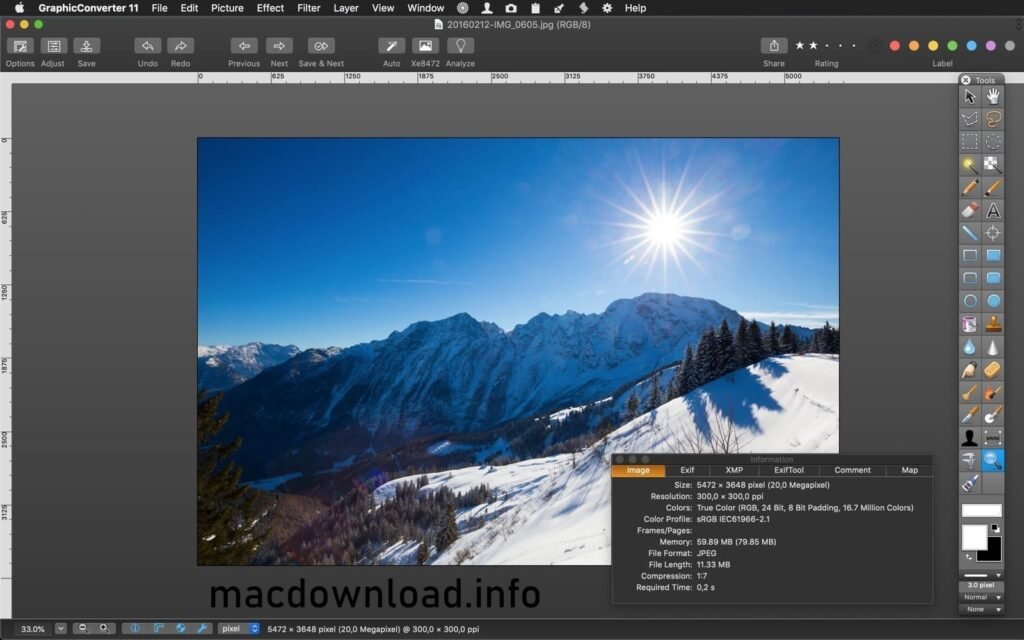
Designed specifically for macOS, GraphicConverter combines speed, flexibility, and compatibility with an impressive range of image formats. Whether you’re converting images, editing photos, managing large image libraries, or preparing graphics for web and print, GraphicConverter for Mac offers a comprehensive set of tools that blends professional features with ease of use.
Key Features of GraphicConverter for Mac
GraphicConverter stands out for its comprehensive feature set, which goes far beyond basic image viewing and editing. Below are the most important features that make GraphicConverter 12.5.1 the best choice for macOS users.
Wide Image Format Support
One of GraphicConverter’s biggest advantages is its ability to open and convert a wide range of file formats. The software supports over 200 image formats, including:
- JPEG, PNG, GIF, TIFF, BMP
- RAW formats from major camera manufacturers
- PSD, PDF, EPS, and SVG
- HEIF and HEIC formats used by Apple devices
This broad support makes GraphicConverter ideal for professionals who frequently work with images from multiple sources.
Advanced Image Editing Tools
GraphicConverter for Mac includes a complete set of image editing tools designed for both beginners and advanced users. These tools allow you to:
- Crop, resize, rotate, and flip images
- Adjust brightness, contrast, saturation, and color balance
- Apply filters and effects
- Perform color corrections and gamma adjustments
- Remove red-eye and noise
While not intended to replace full-fledged photo editing suites, GraphicConverter offers more than enough power for everyday editing and batch processing tasks.
Batch Processing and Automation
Another standout feature is batch processing, which allows users to apply the same edits or conversions to hundreds or thousands of images at once. You can:
- Convert file formats
- Resize images
- Rename files
- Apply color corrections
- Add watermarks
This feature is especially useful for photographers, web developers, and content creators who manage large image libraries.
Image Management and Navigation
GraphicConverter also functions as an efficient image browser. Users can quickly preview images, organize files, and navigate folders with ease. The integrated browser supports:
- Thumbnail previews
- Metadata viewing and editing
- EXIF and IPTC data management
- Keyword tagging and sorting
This makes GraphicConverter a practical alternative to standalone image management tools.
Metadata and Color Profile Support
For professional workflows, metadata accuracy and color management are essential. GraphicConverter supports:
- EXIF, IPTC, and XMP metadata
- ICC color profiles
- On-screen proofing for print workflows
These features ensure consistent color reproduction and proper image documentation.
macOS Integration and Performance
Specifically optimized for macOS, GraphicConverter integrates seamlessly with system features. It’s compatible with:
- Macs with Apple Silicon and Intel processors
- Retina displays
- macOS file system and Quick Look
What’s New in GraphicConverter 12.5.1
Version 12.5.1 focuses on performance improvements, stability enhancements, and improvements that optimize the overall user experience.
Performance Improvements
- GraphicConverter 12.5.1 introduces optimized image rendering and faster batch processing. These improvements result in shorter load times and smoother handling of large image files, especially on newer Macs with Apple Silicon.
Improved Compatibility
- The latest version ensures better compatibility with recent macOS updates. This includes improved support for modern file formats and greater stability when working with high-resolution images.
Bug Fixes and Stability Improvements
- Several minor bugs reported in previous versions have been fixed. These fixes improve reliability during long editing sessions and reduce the likelihood of crashes when processing large sets of images.
User Interface Improvements
- While maintaining its familiar design, GraphicConverter 12.5.1 includes subtle interface tweaks that improve usability and streamline common workflows without interrupting users.
You Can Also Download: Adobe Lightroom Classic for Mac
System Requirements
- Operating System: Latest version of macOS
- Processor: Apple Silicon or modern Intel processor
- RAM: 8 GB or more
- Storage: SSD with at least 500 MB of free space
- Display: Retina display for optimal image clarity
Advantages and Disadvantages of GraphicConverter for Mac
Advantages
- Compatible with a wide range of image formats
- Powerful automation and batch processing tools
- Fast and lightweight compared to full-fledged editing suites
- Excellent metadata support and color management
- Optimized for macOS and Apple Silicon
- Suitable for both beginners and professionals
Disadvantages
- The interface may seem outdated to some users
- Learning curve for advanced features
- Does not completely replace high-end photo editing software
Conclusion
GraphicConverter for Mac 12.5.1 continues to demonstrate why it has remained a trusted image solution for years. Combining broad format support, advanced editing tools, powerful batch processing, and optimization for macOS, it offers exceptional value for a wide range of users.
Whether you’re a photographer managing RAW files, a designer and asset converter, or a casual user looking for a reliable image viewer and editor, GraphicConverter provides a flexible and efficient workflow. The latest updates in version 12.5.1 further improve performance and stability, making it a worthwhile upgrade for existing users and a solid choice for new ones.
Homepage:https://macdownload.info/