OnlySwitch 2.6.6 for MacOS
OnlySwitch 2.6.6 for MacOS Download 2026

OnlySwitch 2.6.6 for Mac also stands out for simplifying the transition between basic system controls and hidden advanced macOS options. Many useful macOS features are buried in system settings or require Terminal commands to activate. OnlySwitch integrates these controls into a simple graphical menu, making advanced configuration easier for all users. As a result, both beginners and advanced users can manage system behavior more efficiently and without technical complexities.
The application is designed to streamline workflow. Instead of interrupting tasks to search through multiple settings panels, OnlySwitch keeps essential controls just a click away in the menu bar. This convenience is especially valuable during multitasking, presentations, development, and content creation. Thanks to its modular switch system and frequent updates, OnlySwitch 2.6.6 continues to evolve as a reliable all-in-one switch manager for modern macOS environments.
OnlySwitch has gained popularity among Mac users thanks to its combination of simplicity and advanced functionality. Instead of installing multiple utilities for different options, users can centralize control in a single, customizable tool for the menu bar. Whether you want to hide desktop icons, enable dark mode, keep your Mac active, or quickly free up memory, OnlySwitch offers a streamlined solution.
Key Features of OnlySwitch 2.6.6 for Mac
OnlySwitch 2.6.6 offers a wide range of system switches and productivity tools. The software focuses on quick access, customization, and performance efficiency. Below are the most important features that make it an essential Mac utility.
One-Click System Switches
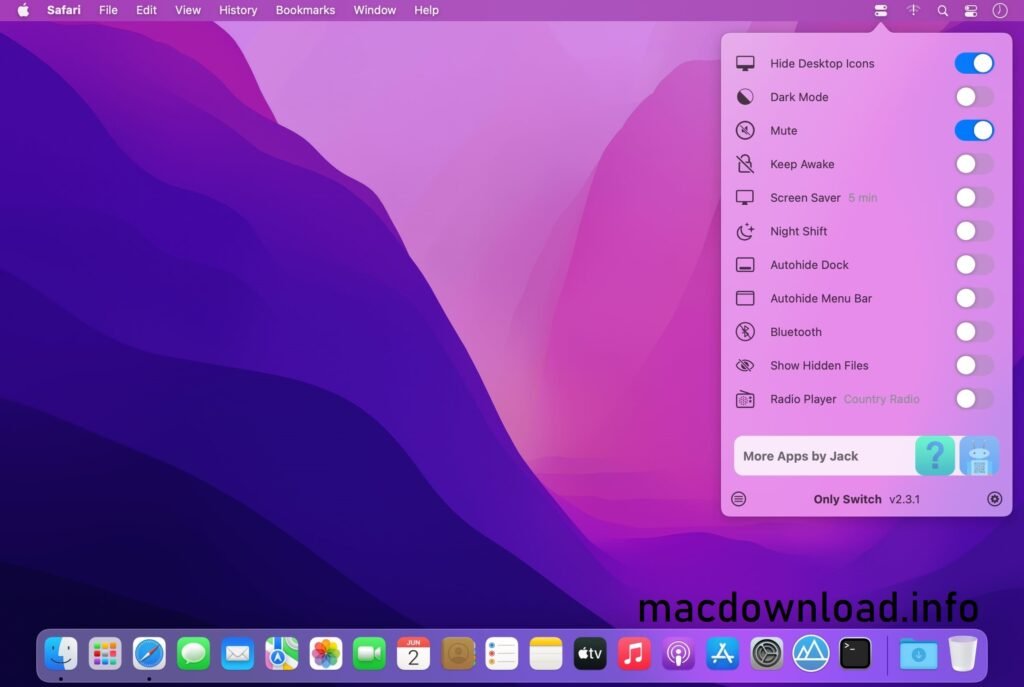
OnlySwitch’s main advantage lies in its one-click switches for the most frequently used macOS functions. Instead of navigating through System Settings, users can instantly toggle functions from the menu bar.
The most common switches include:
- Dark Mode On/Off
- Hide Desktop Icons
- Show/Hide Hidden Files
- Screen Saver Control
- Prevent Mac from Sleeping
- Low Power Mode Switch
- AirPod Shortcut
- Screen Sleep Control
As a result, users save time and reduce repetitive steps throughout the day.
Menu Bar Customization
- OnlySwitch allows users to customize the toggles that appear in the menu. This is especially useful because not all users need every button. You can activate only the tools you actually use, keeping the interface clean and efficient.
Additionally, the buttons can be rearranged for faster access. This flexibility improves workflow and reduces clutter in the menu bar.
Desktop Icon Visibility Control
One of the most appreciated features is the ability to instantly hide or show desktop icons. This is especially useful for:
- Recording screen videos
- Giving presentations
- Taking screenshots
- Reducing visual clutter
With OnlySwitch, cleaning up your desktop becomes a one-click action instead of a manual process of reorganizing files.
Active Mode
The Active Mode button prevents your Mac from going to sleep. This is extremely useful for:
- Long downloads
- Rendering tasks
- Data transfers
- Presentations
- Process monitoring
Instead of manually changing power settings, you can instantly activate active mode.
Quick cleanup and utility tools
OnlySwitch 2.6.6 also includes lightweight maintenance tools that help improve system responsiveness. These tools are designed to be fast and safe.
For example:
- Shortcut to clean memory
- Clear clipboard
- Screen saver trigger
- Quick file visibility control
While not a full-fledged system optimizer, these quick tools are practical for everyday use.
Custom commands and shortcuts
- Advanced users can add custom commands and scripts to OnlySwitch. This means they can trigger terminal commands or automation scripts directly from the menu bar.
This feature is especially useful for developers and advanced users who want deeper system control without having to open Terminal every time.
Native macOS Design
- OnlySwitch faithfully adheres to macOS design standards. The interface feels native and integrates seamlessly with macOS themes. Therefore, it doesn’t feel intrusive or out of place.
What’s New in OnlySwitch 2.6.6
Version 2.6.6 introduces several performance improvements and refinements. While building upon the stable feature base of previous versions, it focuses on reliability and compatibility.
Stability Improvements
The latest version improves the overall stability of the app. User Experience:
- Fewer menu update issues
- Better switch responsiveness
- Improved background performance
As a result, switches run faster and more consistently.
macOS Compatibility Improvements
- OnlySwitch 2.6.6 improves compatibility with the latest macOS versions. System-level switches now work more reliably on updated macOS builds.
This ensures smoother operation on modern MacBooks and desktop Macs.
UI and Behavior Fixes
Minor UI bugs and inconsistencies in switch behavior have been fixed. As a result:
The menu display is more consistent.
- Switch states are more accurately synchronized.
- Shortcut triggers function correctly.
You Can Also Download: AppKiller 4.2.3 for Mac
System Requirements
- macOS Monterey, Ventura, or later
- Apple Silicon (M1/M2/M3 or later) for optimal performance
- 8 GB of RAM or more
- SSD storage
- macOS updates installed
Advantages and Disadvantages of OnlySwitch 2.6.6 for Mac
Every tool has its advantages and disadvantages. Here’s a general overview.
Advantages
- Fast, one-click system actions
- Clean, native macOS interface
- Highly customizable options list
- Lightweight and low resource consumption
- Convenient feature for hiding/showing desktop icons
- Built-in wake mode
- Compatible with custom commands and scripts
- Regular updates and compatibility fixes
Disadvantages
- Not a complete system optimization suite
- Some advanced options depend on macOS permissions
- Advanced features may be underutilized by casual users
- Requires accessibility permissions for certain options
Conclusion
OnlySwitch 2.6.6 for Mac is a practical and efficient menu bar utility that simplifies macOS control. With one-click options, customization options, and productivity-focused features, it helps users manage system behavior quickly and easily.
Furthermore, its compact, native design makes it ideal for both casual and advanced users. From hiding desktop icons to preventing sleep and enabling or disabling hidden files, OnlySwitch brings essential controls together in one accessible place.
Homepage:https://macdownload.info/



1 Response
[…] You Can Also Download: OnlySwitch 2.6.6 for Mac […]