Peakto 2.6.3 – AI Media Organizer for MacOS
Peakto 2.6.3 – AI Media Organizer for MacOS Download

Peakto AI Media Organizer for Mac 2.6.3 is designed to function as an intelligent media hub rather than a traditional cataloging application. Instead of replacing your existing editing tools, it enhances them by creating a unified search layer across multiple libraries and storage locations. Developed by Cyme, Peakto focuses on efficiency, accuracy, and seamless integration with the macOS ecosystem. It allows users to gain complete visibility into their entire media archive without disrupting established workflows. Whether your files are stored locally, on external drives, or in professional editing software, Peakto consolidates access into a single, intelligent interface. This holistic approach makes version 2.6.3 especially valuable for users who require fast retrieval, structured organization, and reliable performance when managing large and complex media collections.
Peakto for Mac AI is designed to centralize, search, and organize media files across multiple platforms and storage locations. Unlike traditional media managers, Peakto uses advanced indexing and intelligent technology to deliver instant search capabilities without duplicating your files.
Key Features of Peakto AI Media Organizer 2.6.3
Peakto AI Media Organizer offers a robust set of features designed to simplify media management. Its main features are detailed below.
Centralized Media Indexing
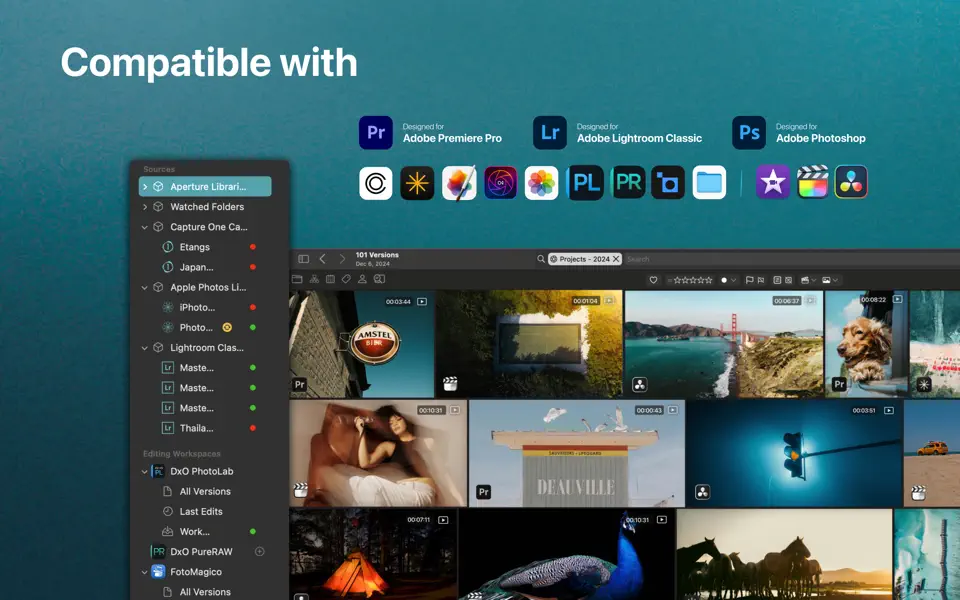
One of Peakto AI’s standout features is its ability to connect multiple sources in a unified dashboard. It integrates with popular platforms such as:
- Adobe Lightroom Classic
- Apple Photos
- Capture One
- Adobe Premiere Pro
By indexing these libraries, Peakto allows users to search across all media collections without switching applications.
AI-Powered Smart Search
Peakto AI 2.6.3 introduces an enhanced smart search function. Users can search by:
- Keywords
- Color
- Metadata
- Text within images
- Visual similarity
This smart search dramatically reduces the time needed to locate specific files, especially in large media libraries.
Non-Destructive Workflow
Unlike traditional organizers, Peakto doesn’t duplicate files. It simply indexes them. Therefore:
- It doesn’t require additional storage space.
- The original folder structure remains intact.
- Your workflow remains uninterrupted.
This makes it ideal for professional photographers and videographers working with high-resolution files.
Cross-Platform Compatibility
Peakto is compatible with multiple editing environments. Whether you use Lightroom, Capture One, or Apple Photos, Peakto integrates them into a single search interface.
Therefore, you no longer need to manually track down where specific files are stored.
Intelligent Categorization
The software automatically categorizes photos and videos using advanced detection algorithms. It can identify:
- Faces
- Objects
- Scenes
- Text
This automated organization improves productivity and helps users create structured files.
Advanced Filtering Options
Peakto AI offers detailed filtering options such as:
- Date
- Rating
- File Type
- Resolution
- Camera Model
These filters offer granular control, allowing users to quickly refine search results.
Clear and Intuitive Interface
- Peakto 2.6.3 features a modern and user-friendly interface optimized for macOS. Navigation is smooth, responsive, and minimalist, ensuring a seamless experience even when managing large collections.
What’s new in Peakto AI Media Organizer 2.6.3?
Version 2.6.3 includes several performance and usability improvements.
Improved Search Performance
- Search indexing has been optimized for faster results. Users will notice quicker responses when searching large libraries.
Improved AI Detection
- Object and scene recognition has been refined, providing more accurate categorization and tagging.
Stability Improvements
- Version 2.6.3 fixes minor bugs and improves overall stability, especially when managing large external storage libraries.
Enhanced Compatibility
- Compatibility updates ensure smoother integration with the latest macOS versions and updated third-party software libraries.
You Can Also Download: Aspect Ratio Pro 3.4 for Mac
System Requirements
- macOS 12 (Monterey) or later
- Apple Silicon (M1/M2/M3) for optimal performance
- 16 GB of RAM or more
- SSD storage
- High-speed internet connection
Advantages and Disadvantages of Peakto AI Media Organizer for Mac
Understanding the advantages and disadvantages of Peakto AI 2.6.3 helps users determine if it fits their needs.
Advantages
- Peakto connects multiple libraries in a centralized dashboard.
- No file duplication, saving storage space
- Advanced detection significantly reduces search time.
- Ideal for photographers, videographers, and content creators.
- Clear and simple interface designed specifically for Mac users.
Disadvantages
- Currently unavailable for Windows users.
- Indexing massive collections may require more RAM and SSD storage.
- Some users may prefer the one-time purchase option.
Conclusion
Managing digital media efficiently is becoming increasingly important. Peakto AI Media Organizer for Mac 2.6.3 offers a smart, centralized solution that simplifies finding and organizing large photo and video collections.
With its enhanced AI detection, optimized performance, and cross-platform compatibility, Peakto positions itself as a leading media organizer for macOS users. Whether you’re a professional content creator or a regular Mac user, this tool offers practical benefits that significantly improve workflow efficiency.