Swinsian 3.0.5 for MacOS
Swinsian 3.0.5 for MacOS Download 2026

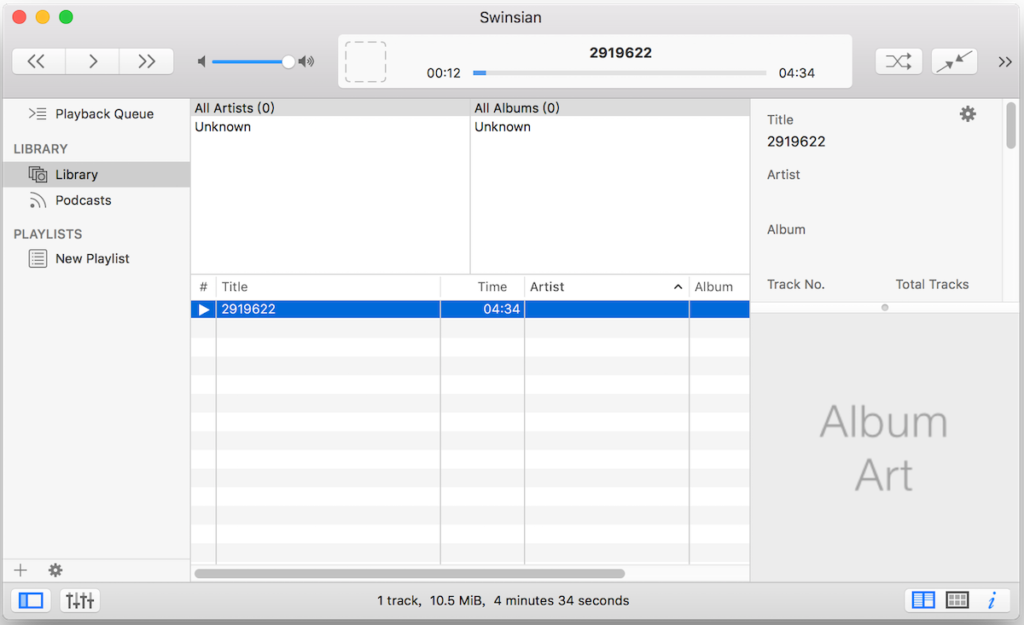
Swinsian 3.0.5 for Mac is a powerful yet lightweight music management application designed specifically for macOS users who want greater control over their audio libraries. While many users rely on their default media players, Swinsian stands out by offering advanced library organization tools, fast performance, and extensive customization options. It is especially popular among users with large music collections who need efficient tagging, browsing, and playback features.
Unlike more powerful music platforms, Swinsian focuses on speed, simplicity, and professional-level library management. As a result, it has become the preferred choice of audiophiles, DJs, and music collectors. Swinsian 3.0.5 continues this tradition by optimizing performance, improving compatibility with modern macOS versions, and streamlining metadata management.
Key Features of Swinsian 3.0.5 for Mac
Advanced Music Library Management
One of the highlights of Swinsian for Mac is its advanced music library management system. It’s designed to handle very large collections without slowing down your system. The application quickly scans, indexes, and organizes tracks, even with tens of thousands of files.
Users can sort and filter music by:
- Artist
- Album
- Genre
- Year
- Composer
- Custom Tags
In addition, the multi-column browser makes navigation easier and more precise than that of many standard music players.
Powerful Tag Editing Tools
Swinsian 3.0.5 includes a powerful tag editor that allows batch editing of metadata. This feature is extremely useful for those who maintain detailed and organized libraries.
Tag editing features include:
- Batch renaming
- Editing multiple track tags at once
- Automatically retrieving metadata
- Editing album art
- Customizing tag fields
This makes organizing messy music collections much faster and more accurate.
Extensive Audio Format Support
Another major advantage of Swinsian is its broad audio format support. It’s not limited to the most common file types and also works well with high-quality audio formats.
Supported formats typically include:
- MP3
- AAC
- ALAC
- FLAC
- WAV
- AIFF
- OGG Vorbis
- WMA (DRM-free)
Therefore, users with mixed-format libraries can manage everything from a single location without needing format converters.
Smart Playlists and Automatic Rules
Swinsian offers smart playlists that automatically update based on the rules you define. This is especially useful for users who prefer dynamic collections.
You can create rules based on:
- Number of plays
- Release date
- Genre
- Rating
- Bitrate
- Year
As a result, your playlists are automatically updated and organized without the need for manual editing.
Duplicate File Finder
Large music libraries often contain duplicate tracks. Swinsian 3.0.5 includes a built-in duplicate finder that scans your library and identifies repeated files.
This tool helps you:
- Free up storage space
- Remove redundant tracks
- Organize cluttered collections
- Improve library accuracy
Fast Search and Navigation
- Speed is one of Swinsian’s defining qualities. Its search function is instantaneous and highly responsive. Even with very large libraries, results appear instantly.
In addition, keyboard navigation and shortcut support allow advanced users to navigate collections efficiently.
Mini Player and Custom Interface
- Swinsian includes a mini player mode that keeps playback controls accessible without taking up much screen space. Users can also customize columns, layouts, and display options to match their workflow.
What’s New in Swinsian 3.0.5
Swinsian 3.0.5 introduces several performance and optimization improvements for modern macOS environments. While the core philosophy of speed and control remains, this version focuses on stability and compatibility.
Key improvements include:
- Improved compatibility with the latest macOS versions
- Improved library scanning performance
- Greater accuracy in metadata analysis
- Stability fixes during large batch edits
- More reliable artwork management
- Reduced memory usage during indexing
- Improved user interface responsiveness
You Can Also Download: BeaTunes 5.2.36 for Mac
System Requirements
- macOS 12 or later
- Apple Silicon or modern Intel processor
- 8 GB of RAM or more
- SSD storage for faster library indexing
- Ample free disk space for music collections
- High-resolution display for a better user experience
Advantages and Disadvantages of Swinsian 3.0.5 for Mac
Advantages
- Extremely fast with large music libraries
- Advanced tag editing and batch processing tools
- Excellent metadata control
- Broad support for audio formats
- Duplicate file detection
- Smart playlists with rule-based automation
- Lightweight and efficient design
- Customizable interface and columns
- Minimal system resource consumption
Disadvantages
- Not focused on streaming services
- The interface is functional, but not modern
- No cloud music integration
- Learning curve for advanced features
- Limited compatibility with mobile ecosystems
Conclusion
Swinsian 3.0.5 for Mac is a high-performance music management solution designed for users who value speed, control, and precision. It excels at organizing libraries, editing metadata, and managing large music collections. While it doesn’t focus on streaming features, it offers exceptional performance for local audio management.
Homepage:https://swinsian.com/