Tab Launcher 2.9.5 for MacOS
Tab Launcher 2.9.5 for MacOS Download

Tab Launcher 2.9.5 is a productivity-focused utility designed to help users quickly access frequently used websites, web applications, and tools from a centralized panel. Instead of manually opening multiple browser tabs, users can open grouped tabs with a single click, saving time and improving workflow efficiency.
Tab Launcher version 2.9.5 offers performance improvements, greater compatibility with modern macOS versions, and enhanced usability features. Whether you’re a student, professional, developer, or casual user, this tool simplifies your browser interaction and boosts your daily productivity.
Key Features of Tab Launcher 2.9.5 for Mac
Tab Launcher is designed to reduce repetitive browser tasks and provide instant access to important web resources. Below are the key features that make this software a valuable tool for Mac users.
One-Click Tab Groups
One of the standout features is the ability to open multiple websites simultaneously using predefined groups. For example, you can create groups such as:
- Work Tools
- Social Networks
- Research Resources
- Entertainment Sites
With a single click, all associated tabs open at once, allowing users to start working immediately without manual configuration.
Customizable Dashboard
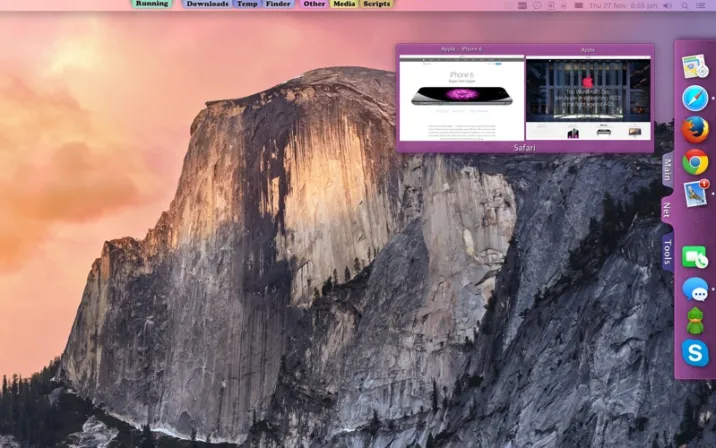
Tab Launcher offers a visually organized interface where users can arrange shortcuts, categories, and groups. This customizable design helps users:
- Prioritize frequently used sites
- Reduce clutter
- Improve visual navigation
Users can also rename groups, reorder items, and choose icons for better recognition.
Lightweight and High-Performance
- The software is optimized to run smoothly without consuming excessive system resources. Even on older Mac systems, Tab Launcher maintains responsive performance, making it compatible with both modern and older devices.
Browser Integration
Tab Launcher is compatible with popular browsers such as:
- Safari
- Google Chrome
- Mozilla Firefox
This flexibility ensures users aren’t limited to a single browsing environment, which is especially useful for professionals who use browser-specific tools.
Cloud Sync (where supported)
- Some versions of Tab Launcher support cross-device syncing, allowing users to maintain the same tab groups across multiple systems. This is ideal for users who switch between workstations or laptops.
Minimal Learning Curve
- The interface is intuitive and easy to use, requiring no technical expertise. Users can start creating tab groups immediately after installation, making it accessible to all experience levels.
What’s New in Tab Launcher 2.9.5
Version 2.9.5 focuses on stability, performance, and compatibility improvements. While it doesn’t represent a major feature overhaul, this update offers significant enhancements that optimize the overall user experience.
Improved macOS Compatibility
- Tab Launcher 2.9.5 is optimized for compatibility with the latest macOS versions, ensuring smoother operation and reducing system conflicts. This helps prevent crashes and startup errors, often caused by outdated software dependencies.
Faster Startup
- The application now loads faster, allowing users to access their dashboards almost instantly after launching the program. This improvement is especially noticeable on systems with limited hardware resources.
Bug Fixes and Stability Improvements
Several minor bugs from previous versions have been fixed, including:
- Shortcut loading delays
- Interface issues on Retina displays
- Browser transfer inconsistencies
These fixes contribute to a more reliable and optimized user experience.
Improved UI Responsiveness
- Small UI improvements make navigation smoother and more visually consistent, especially when managing larger tab groups.
You Can Also Download: Privatus for Mac
System Requirements
For optimal performance and smooth multitasking:
- Operating System: macOS 11 (Big Sur) or later
- Processor: Intel Core i5 or Apple Silicon (via Compatibility Layer)
- Memory (RAM): 4 GB or more
- Storage Space: 200 MB of available disk space
- High-speed internet connection
- Updated Browsers: Latest versions of supported browsers
Advantages and Disadvantages of Tab Launcher 2.9.5 for Mac
Every software solution has its advantages and disadvantages. Understanding both helps users determine if Tab Launcher fits their workflow.
Advantages
- Boosts productivity: Quickly opens grouped websites without repetitive manual configurations.
- Easy to use: Clear interface with a minimal learning curve.
- Lightweight application: Doesn’t consume excessive system resources.
- Browser compatibility: Works with all major Mac browsers.
- Time-saving automation: Ideal for daily workflows and repetitive tasks.
- Organized workflow: Keeps browsing sessions structured and efficient.
Disadvantages
- Limited advanced automation: Doesn’t support complex scripts or task automation beyond launching tabs.
- Basic design options: Visual customization is functional but not very advanced.
- Cloud syncing may vary: Syncing features depend on the version and settings.
- It’s not a complete productivity suite: It focuses primarily on managing tabs and web sessions.
Conclusion
Tab Launcher 2.9.5 for Mac is a practical and efficient productivity tool designed to simplify web workflows. By allowing users to open multiple tabs and websites with a single click, it eliminates repetitive navigation tasks and improves overall efficiency.
Homepage:https://macdownload.info/



2 Responses
[…] You Can Also Download: Tab Launcher 2.9.5 […]
[…] You Can Also Download: Tab Launcher 2.9.5 for Mac […]