TinkerTool System 9.86 for MacOS Download
TinkerTool System for Mac 9.86 stands out as a powerful yet user-friendly utility. Developed by Marcel Bresink Software-Systeme, this professional tool is designed to help users maintain, repair, optimize, and customize their macOS environment without compromising system integrity.
Unlike many third-party customization utilities, TinkerTool System integrates seamlessly with macOS while respecting Apple’s system architecture. It offers enhanced control over hidden system features, maintenance tasks, troubleshooting tools, and customization options. Whether you’re a casual Mac user, a system administrator, or an advanced user, TinkerTool System 9.86 provides a structured and secure method for effectively managing your Mac.
Key Features of TinkerTool System for Mac 9.86:
TinkerTool System is much more than just a customization application. It combines system diagnostics, repair utilities, customization options, and advanced maintenance features within a single, intuitive interface.
Advanced System Maintenance Tools:
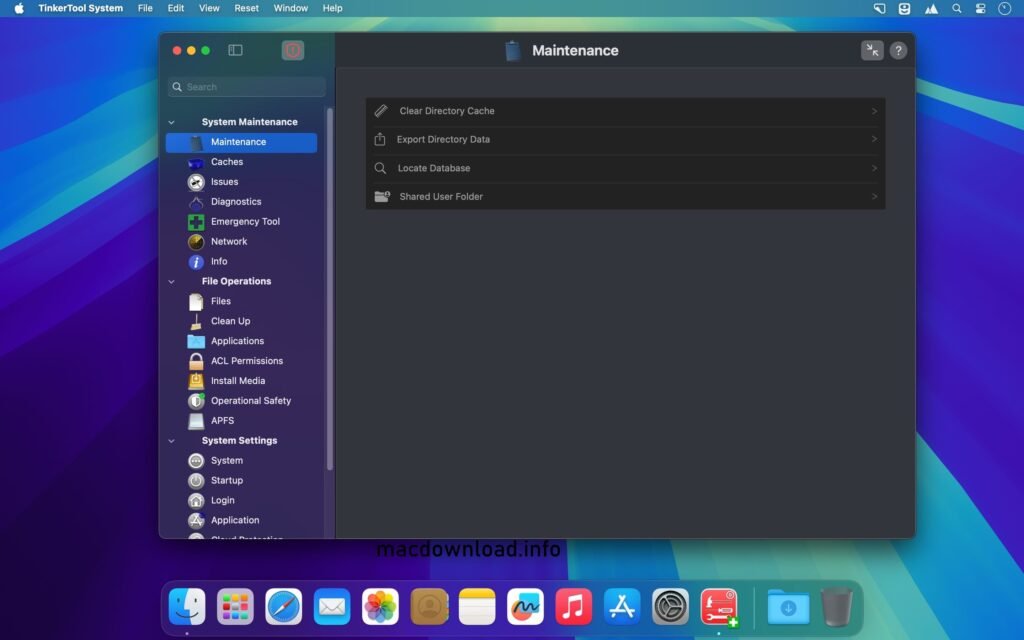
One of TinkerTool System’s key strengths is its comprehensive suite of maintenance tools. Users can:
- Check and repair file system permissions
- Clear system caches
- Manage startup services
- Reset the startup services database
- Rebuild the Spotlight index
- Clear system logs
These tools help maintain system stability and improve overall macOS performance. Furthermore, the application ensures that maintenance tasks are performed using Apple-approved system APIs.
Advanced macOS Customization:
TinkerTool System provides access to hidden macOS settings, typically inaccessible through System Settings.
You can:
- Customize Finder behavior
- Adjust Dock animations
- Modify login window settings
- Change system font preferences
- Enable hidden features
Important: Changes are applied at the user level, ensuring the security and reversibility of your system.
Emergency Tool and Recovery Mode Access:
If you experience problems starting your Mac, TinkerTool System offers an emergency tool. This module allows you to:
- Access system repair tools from Recovery Mode
- Diagnose system crashes
- Repair corrupted user accounts
- Reset system preferences
This feature is especially useful for IT professionals who manage multiple Macs.
Privacy and Security Controls:
In today’s digital environment, privacy is essential. TinkerTool System allows you to manage:
- macOS privacy settings
- Background services
- Application permissions
- Network configurations
By providing seamless access to hidden system settings, users gain greater control over their Mac’s behavior.
Safe and Reversible Modifications:
Unlike many system customization utilities, TinkerTool System guarantees:
- No permanent system modifications
- No background process injection
- No forced system alterations
- Complete reversibility of modifications
Therefore, it remains one of the safest macOS customization tools on the market.
What’s New in TinkerTool System 9.86:
TinkerTool System version 9.86 offers improved compatibility and performance, optimized for the latest macOS versions.
Improved macOS Compatibility:
Version 9.86 enhances support for recent macOS updates, ensuring seamless integration with Apple’s latest security and system architecture changes.
- Improved System Diagnostics
- The diagnostic module now offers:
- More detailed crash analysis
- Faster system analysis
- Improved log processing performance
Redesigned User Interface:
- The interface has been optimized for greater clarity and usability. Navigation between system sections is smoother, and tool descriptions are clearer for both beginners and advanced users.
Bug Fixes and Stability Improvements:
- This latest version fixes minor bugs present in previous versions and improves the overall reliability of the application.
Thanks to these updates, TinkerTool System 9.86 offers improved stability, security, and compatibility with modern Mac systems.
You Can Also Download:
System Requirements:
- macOS compatible with currently supported versions
- Intel or Apple Silicon Mac
- At least 4 GB of RAM
- 100 MB of available disk space
- Administrator privileges required for system modifications
Advantages and Disadvantages:
Advantages:
- Comprehensive macOS maintenance tools
- Advanced system customization options
- Safe and reversible modifications
- No persistent background processes
- Professional-grade diagnostics
- Excellent compatibility with recent macOS versions
- Clear and structured user interface
Disadvantages:
- Advanced features can be complex for beginners
- Some functions require technical knowledge
- Paid tool (limited trial version)
- Requires administrator privileges for optimal operation
Conclusion:
TinkerTool System for Mac 9.86 is a robust and professional macOS maintenance and customization tool, offering reliable performance and secure system control. With its advanced diagnostics, extensive customization options, disaster recovery tools, and complete reversibility of changes, it provides a comprehensive solution for effective macOS management.
Homepage:https://macdownload.info/
1 thought on “TinkerTool System 9.86 for MacOS”