CleanClip 2.4.6 For MacOS
CleanClip 2.4.6 For MacOS Download

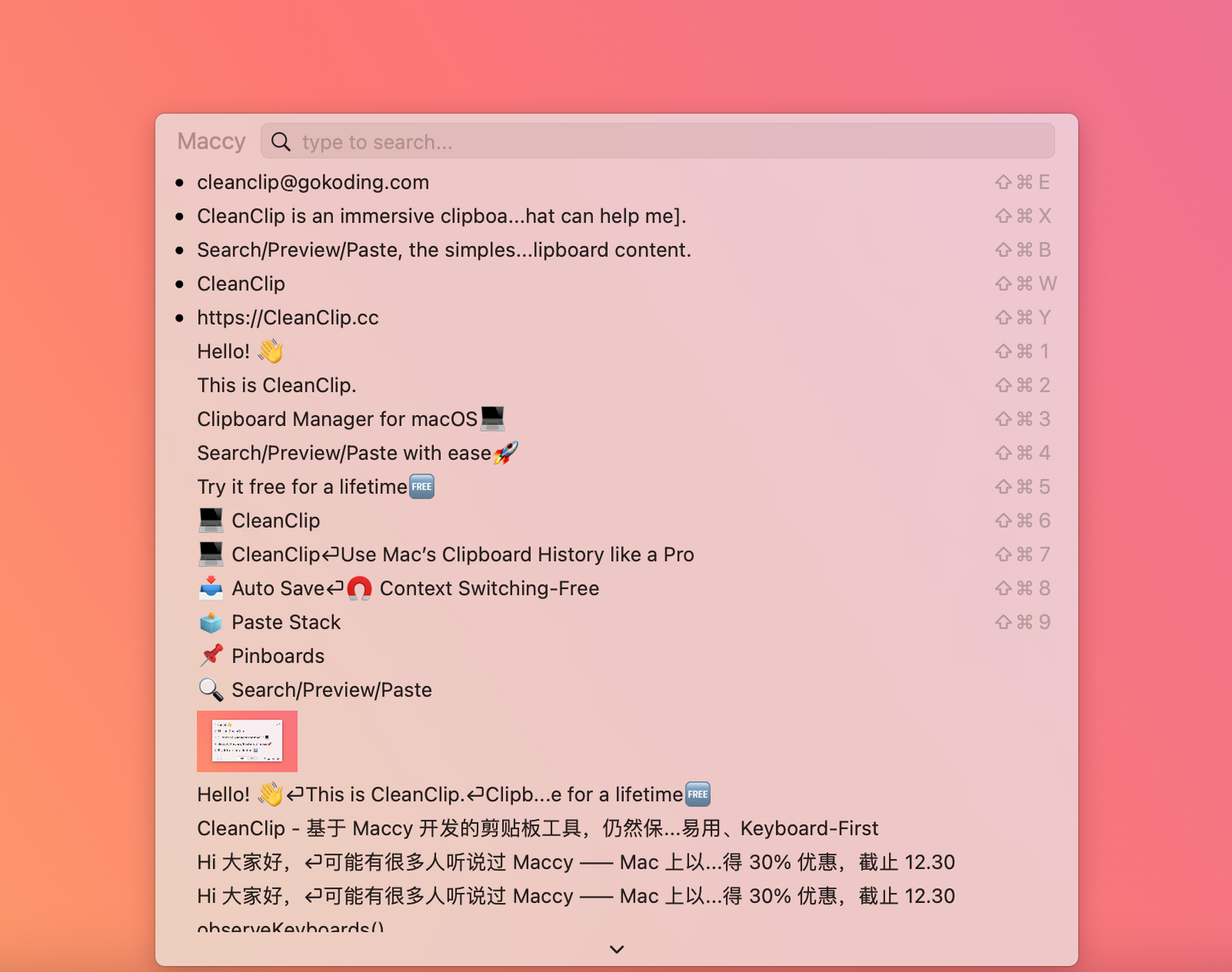
CleanClip 2.4.6 for macOS is a modern clipboard manager designed to simplify copy and paste while offering a lightweight and minimalist interface. The application prioritizes quick keyboard access, intelligent organization tools, clipboard history management, and efficient content reuse.
CleanClip is designed for:
- Productive users
- Writers
- Developers
- Graphic designers
- Office workers
Unlike many overly complex clipboard utilities, CleanClip prioritizes speed, simplicity, and an intuitive user experience, while still offering advanced features such as smart lists, paste stacks, quick menus, and application-specific clipboard management.
Key Features of CleanClip 2.4.6:
Clipboard History Management
CleanClip’s main feature is its clipboard history system.
The application automatically saves copied content, allowing users to quickly access previously copied items instead of losing them when copying something new.
Clipboard-compatible content includes:
- Text
- Images
- Files
- Rich Content
- Templates
- Application-Specific Data
This feature significantly improves productivity for repetitive tasks.
Quick Menu Interface
CleanClip includes a keyboard-optimized quick menu designed for fast access to the clipboard.
Users can:
- Instantly open the menu using keyboard shortcuts
- Search the clipboard history
- Quickly paste items
- Access saved collections
- Work without taking their eyes off the keyboard
The quick menu appears near the text input area, enhancing immersion and reducing interruptions.
The quick menu is frequently praised on forums for its efficiency and minimalist design.
Keyboard-centric workflow
One of CleanClip’s key strengths is its keyboard-centric workflow system.
Users can:
- Open the clipboard history using keyboard shortcuts
- Quickly paste with the numeric keypad
- Instantly search for items
- Navigate content without using the mouse
This workflow design improves efficiency for power users and developers.
Comprehensive Format Support
CleanClip supports a wide range of clipboard content formats.
Supported formats include:
- Plain Text
- Rich Text
- Images
- Files
- App Templates
- Sketch Styles
- Specialized App Content
This broad compatibility makes the app useful in many professional workflows.
Smart Lists and Filtering
The smart list system helps users intelligently organize and filter clipboard history.
Users can create filters based on:
- Keywords
- Regular Phrases
- Source Applications
- Media Types
Custom Rules
Smart lists enable automatic organization of copied content for faster retrieval.
This feature is especially useful for:
- Developers
- Writers
- Researchers
- Customer support teams
Unlimited collection lists
CleanClip supports an unlimited number of collection lists and bookmarks.
Users can:
- Save reusable snippets
- Organize templates
- Store frequently used answers
- Create categorized content groups
This reduces repetitive copy-pasting and improves long-term productivity.
What’s New in CleanClip 2.4.6?
Improved Quick Menu Customization
Recent Updates:
- Additional Keyboard Shortcuts
- Improved Quick Menu Customization
- Greater Workflow Flexibility
These changes improve the user experience for advanced users.
Enhanced Smart List Features
Version 2.x significantly improved Smart List functionality with:
- Improved Filtering Systems
- Regular Expression Support
- Application-Specific Organization
- Collection-Based Workflows
This improves clipboard history management.
Features for Pinning Items to the Clipboard
The latest versions allow you to:
- Pin copied content
- Keep snippets visible
- Instantly access important items
This improves workflow continuity during long projects.
Improved Apple Silicon Processor Support
The latest versions include native support and optimization for Apple Silicon processors.
Benefits:
- Improved performance
- Lower power consumption
- Greater responsiveness
Optimized stability and workflow
Version 2.4.6 also improves:
- Clipboard detection
- Search capabilities
- Keyboard management
- Paste reliability
- Multi-application workflow
These improvements optimize everyday use.
You can also Download: Hides 7.3.0 for MacOS Download
Screenshots:
System Requirements:
Minimum System Requirements
To use CleanClip 2.4.6 optimally on macOS, the minimum system requirements are as follows:
- Operating System: macOS 12 Monterey or later
- Processor: 64-bit Intel or Apple Silicon processor
- RAM: 4 GB minimum
- Storage: Approximately 50 MB of available disk space
- Additional Configuration: Access permissions for clipboard management
Compatibility with macOS 12 and later confirmed.
System Requirements
For smoother multitasking and improved clipboard history management, the following configuration is recommended:
- Operating System: macOS Ventura, Sonoma, or later
- Processor: Apple M1, M2, M3, or later
- RAM: 8 GB or more
- Storage: SSD recommended
- Display: Retina display recommended
Following the recommended configuration improves responsiveness during demanding tasks.
Advantages and Disadvantages of CleanClip 2.4.6:
Advantages:
- Minimalist interface
- Clean and distraction-free design
- Intelligent list organization
- Low resource consumption
- Runs smoothly in the background
- “Paste to Stack” feature
Disadvantages
- Learning curve for advanced features
- Some features require accessibility permissions
- Limited visual customization
- Community resources remain relatively limited.
Conclusion:
CleanClip 2.4.6 for macOS is a lightweight and powerful clipboard management application designed to maximize productivity through quick keyboard shortcuts, intelligent clipboard organization, and advanced paste management tools. With features such as quick menu access, smart lists, stack-based paste workflows, “Follow Active Application” mode, clipboard pinning, and support for all formats, CleanClip stands out as one of the most modern clipboard managers available for Mac users.