IINA 1.4.1 for MacOS Download Latest

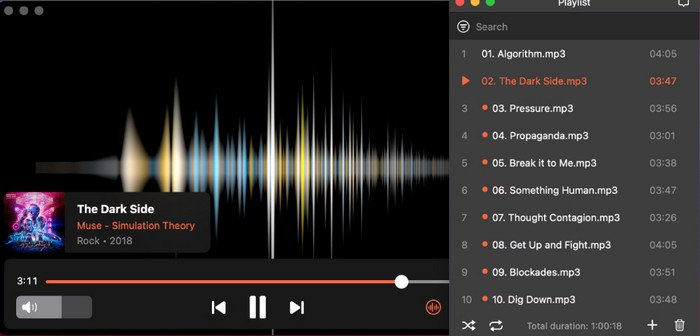
IINA 1.4.1 for MacOS is a video player developed for macOS. Specifically designed for macOS, IINA integrates seamlessly with Apple’s modern interface, offering a smooth, intuitive, and ultra-responsive playback experience. Unlike traditional media players, it leverages native macOS technologies to combine performance and aesthetics.
Furthermore, those looking for a free video player for Mac with advanced playback features, a lightweight player for macOS, or the best alternative to VLC for Mac will find IINA an exceptional option. It supports a wide range of formats and guarantees optimal efficiency without impacting system performance. It appeals to both casual users and professionals.
With the release of version 1.4.1, IINA introduced several improvements that optimize usability, compatibility, and playback quality. Whether you want to download IINA for free for Mac, install the IINA media player on macOS, or discover a modern video player for macOS, this guide provides all the necessary information.
Key Features of IINA for Mac:
Native macOS Design:
IINA is built with the latest Apple frameworks, ensuring a native macOS experience and smooth interface transitions. It integrates seamlessly with the system.
Wide Compatibility:
IINA supports virtually all common audio and video formats, including:
- MP4, MKV, AVI, MOV
- MP3, FLAC, AAC
This provides users with a universal media playback solution on Mac, without the need to install codecs.
Advanced Playback Controls:
IINA also offers:
- Gesture Controls
- Picture-in-Picture Mode
- Touch Bar Compatibility
- Subtitle Customization
These features make it the ideal video player for Mac, offering gesture controls and subtitle support.
Online Streaming Compatibility:
IINA also allows you to play online videos directly via a URL, making it an ideal media player for Mac for streaming content.
Customization Options:
Users can customize themes, controls, and playback settings. This makes IINA a fully customizable media player for macOS.
High Performance and Efficiency:
Thanks to hardware acceleration, IINA guarantees:
- Smooth 4K playback
- Low CPU usage
- Fast loading
It is therefore ideal for those looking for a high-performance 4K video player for Mac.
What’s New in IINA 1.4.1?
This update includes several improvements:
- Improved compatibility with the latest macOS versions
- Optimized subtitle rendering and synchronization
- Enhanced performance for high-resolution videos
- Bug fixes and stability improvements
- Improved user interface responsiveness
Version 1.4.1 thus offers a more polished experience for users seeking a stable update to their media player for Mac (2026).
You can also Download:
Adobe Lightroom Classic v15.1.1 for MacOS
QMidi Standard 2.7.0.1 for MacOS
System Requirements:
Minimum System Requirements:
- macOS 10.13 or later
- Intel or Apple Silicon processor
- 2 GB of RAM
- 200 MB of free disk space
Recommended System Requirements:
- macOS 12 or later
- Apple M1/M2/M3 or Intel i5+ processor
- 4 GB of RAM or more
- SSD for optimal performance
Overview:
IINA runs efficiently on most recent Macs, making it a lightweight media player for entry-level Mac systems.
Installation Guide:
Although IINA doesn’t require an ISO image or a bootable USB drive like operating systems, its installation is simple. Follow these steps:
Step 1: Download IINA for Mac
First, download the latest version (1.4.1) from a trusted source.
Step 2: Open the DMG File
Once downloaded, open the .dmg file to access the installer.
Step 3: Drag to Applications Folder
Next, drag the IINA application to the Applications folder.
Step 4: Launch the Application
Next, open IINA from the Applications folder.
Step 5: Grant Permissions
If prompted, grant the necessary macOS permissions.
Step 6: Start Playback
Finally, open any media file and enjoy smooth playback.
Installing IINA is therefore quick and easy, making it the ideal solution for users looking for a simple installation guide for a media player on Mac.
Advantages and Disadvantages:
Advantages:
- Free and open source
- Modern macOS interface
- Compatible with almost all formats
- Lightweight and fast
- Regular updates
Disadvantages:
- Limited advanced editing features
- Not available for Windows
- Some plugins require manual configuration
Tips and Guides:
- To get the most out of IINA, follow these tips:
- Use keyboard shortcuts for faster navigation
- Enable hardware acceleration for smoother playback
- Customize subtitles for better readability
- Use Picture-in-Picture mode for multitasking
- Keep the application updated to take advantage of the latest features
These tips will also help you optimize your experience as a professional media player user on Mac.
Frequently Asked Questions:
Is IINA free?
Yes, IINA is completely free and open source.
Is IINA safe?
Yes, it is safe if downloaded from trusted sources.
Can IINA play all video formats?
Yes, it supports almost all major video and audio formats.
Is IINA better than VLC for Mac?
In many cases, yes. It offers a more modern interface and better integration with macOS.
Does IINA support subtitles?
Yes, it offers advanced subtitle customization options.
Conclusion:
IINA for Mac 1.4.1 is an excellent choice for those looking for a fast, modern, and feature-rich media player for macOS. It not only supports a wide range of formats but also provides a smooth and optimized user experience for Mac users.
Homepage: macdownload.info